

COD Fee by Location

COD Fee by Location for WooCommerce

Add Cash on Delivery Fees by ZIP Code, City, State & Country

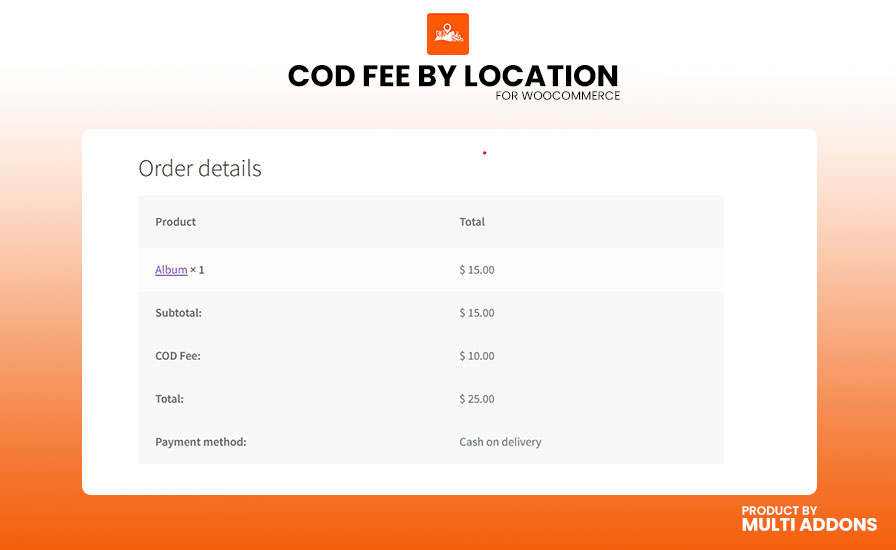
Add a flexible WooCommerce COD fee based on your customer’s location, cart total, products, categories, shipping method, or user role. COD Fee by Location lets you automatically apply a fixed or percentage-based Cash on Delivery (COD) surcharge at checkout, helping you recover additional shipping, handling, and delivery costs.

Set different COD fees for specific ZIP codes, postcodes, cities, states, or countries. For example, charge a $5 fixed COD fee for selected ZIP codes, apply a 10% surcharge to international orders, or create conditional rules based on your cart and products. With its powerful rule-based system, you can create unlimited COD fee rules and control exactly when and where the surcharge applies.

Built for modern WooCommerce stores, COD Fee by Location is compatible with WooCommerce HPOS and the WooCommerce Blocks Checkout, giving you a reliable way to manage location-based Cash on Delivery fees without custom coding.

Marketplace Verified

Extension Partner

30-Day Money-Back Guarantee

Try COD Fee by Location risk-free. If the plugin isn’t the right fit for your WooCommerce store, you can request a refund within 30 days.

Choose Your WooCommerce Plan

Choose a COD Fee by Location license that fits your business. Get flexible pricing options for a single WooCommerce store, multiple websites, or unlimited sites.

1 Site License

$49/y

7-day Free Trial

Most Popular

3 Sites License

$98 $79/y

7-day Free Trial

100 Sites License

$199 $99/y

7-day Free Trial

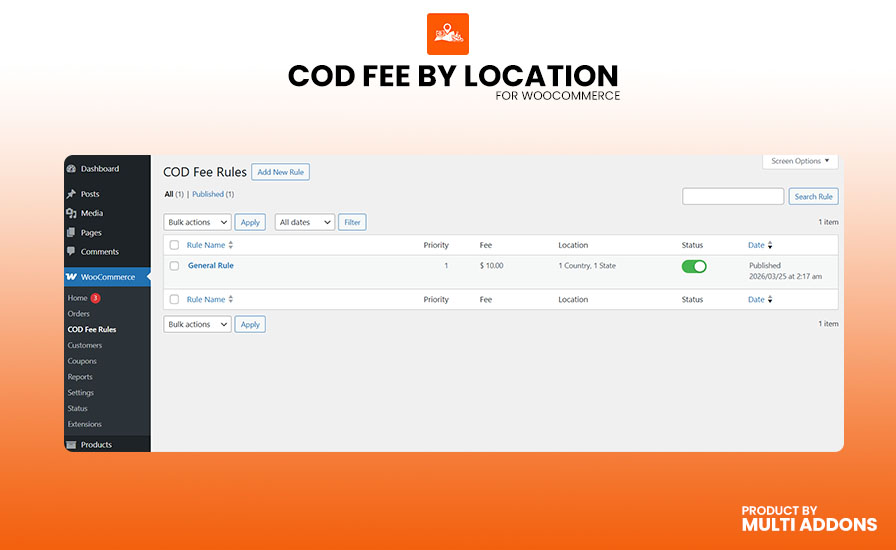
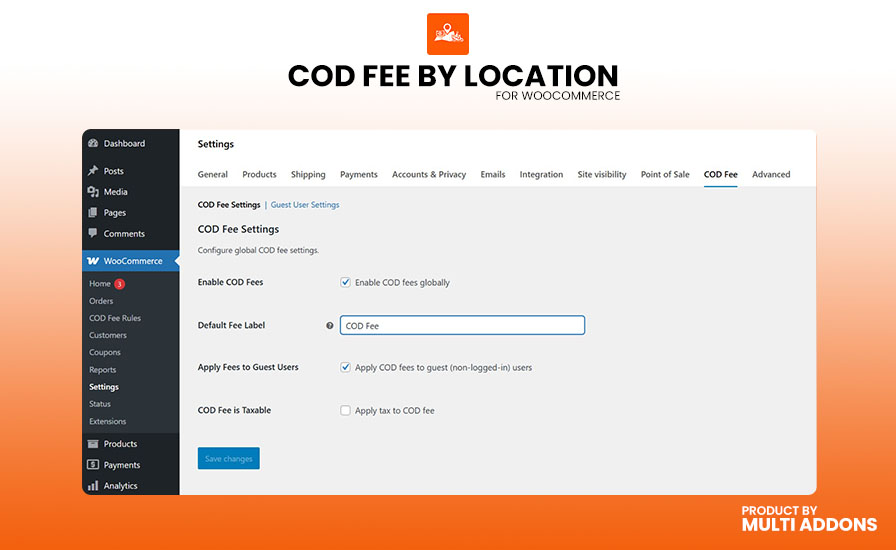
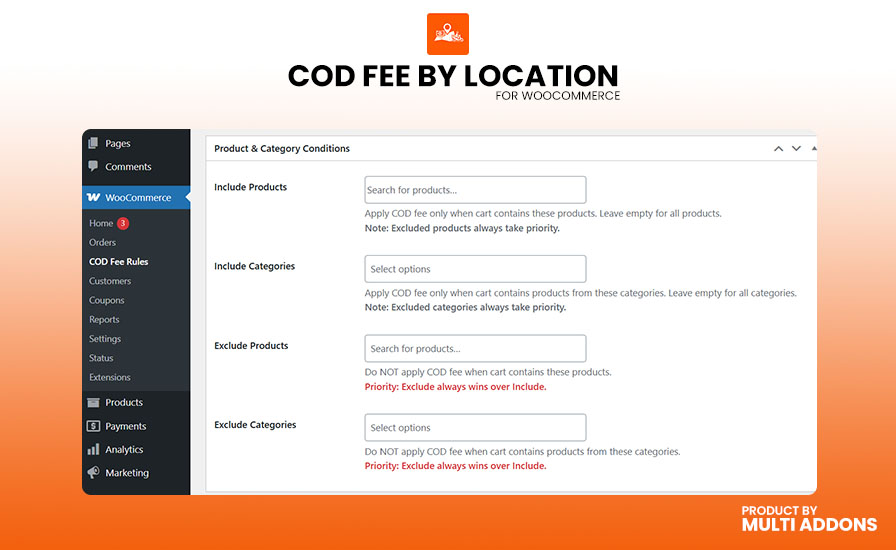
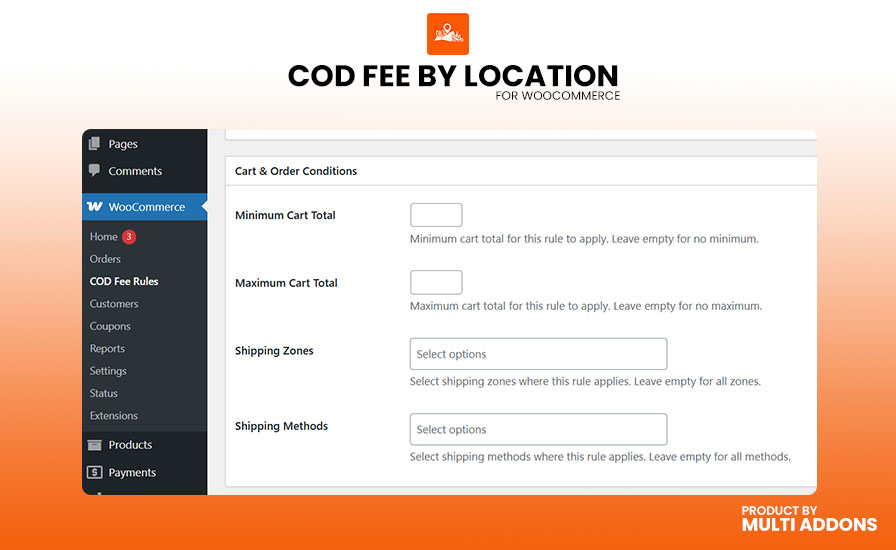
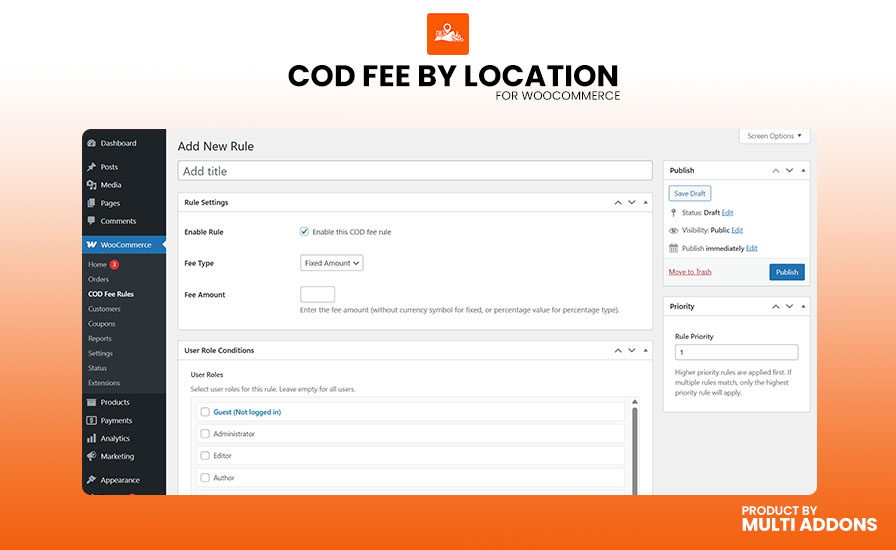
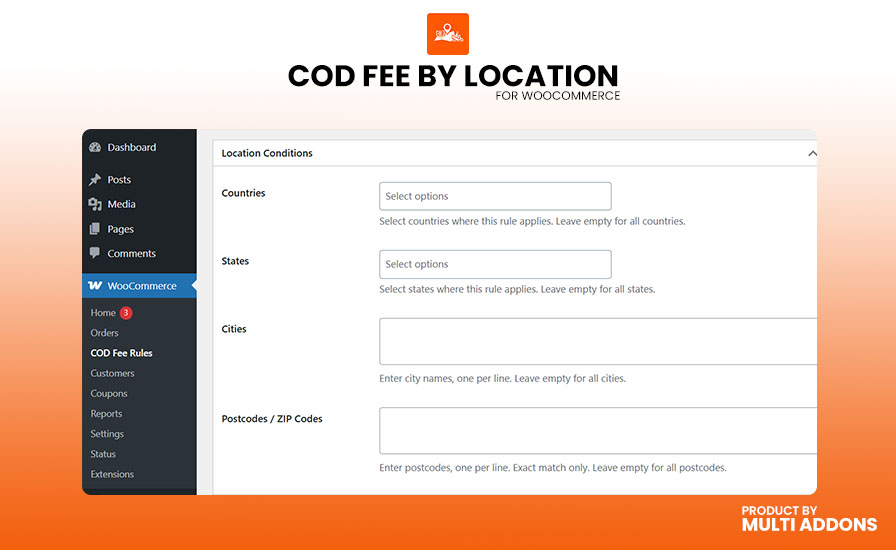
Plugin ScreenShot

See how COD Fee by Location makes it easy to create and manage Cash on Delivery fees based on location, cart conditions, products, and other flexible rules.

Core Features & Capabilities

Flexible Location-Based COD Fees

Set different Cash on Delivery (COD) fees in WooCommerce based on your customer’s delivery location. Apply fixed or percentage-based COD surcharges by country, state, city, ZIP code, or postcode.

Create flexible location-based rules to charge the right WooCommerce COD fee for different delivery areas and recover additional shipping, handling, or delivery costs.

This is the version I would use. It targets the important search variations without making the section look keyword-stuffed.

Flexible WooCommerce COD Fee Calculation

Choose how to charge your Cash on Delivery (COD) fee in WooCommerce with fixed or percentage-based surcharges. Set taxable fees and automatically calculate the right COD charge for every order.

Charge a fixed COD fee such as $5, apply a percentage-based COD surcharge such as 3%, and support multi-currency stores with compatible currency switchers such as WPML and WOOCS

Advanced Cart & Product Conditionals

Apply WooCommerce COD fees based on your cart total, products, and product categories. Set minimum and maximum cart values to control when the Cash on Delivery surcharge is applied, such as waiving the fee for orders above a specific amount.

Add COD fees only when selected products or categories are in the cart, or exclude specific products from the surcharge. These flexible conditions give you precise control over when the WooCommerce COD fee is applied at checkout.

Smart COD Fee Rule Priorities

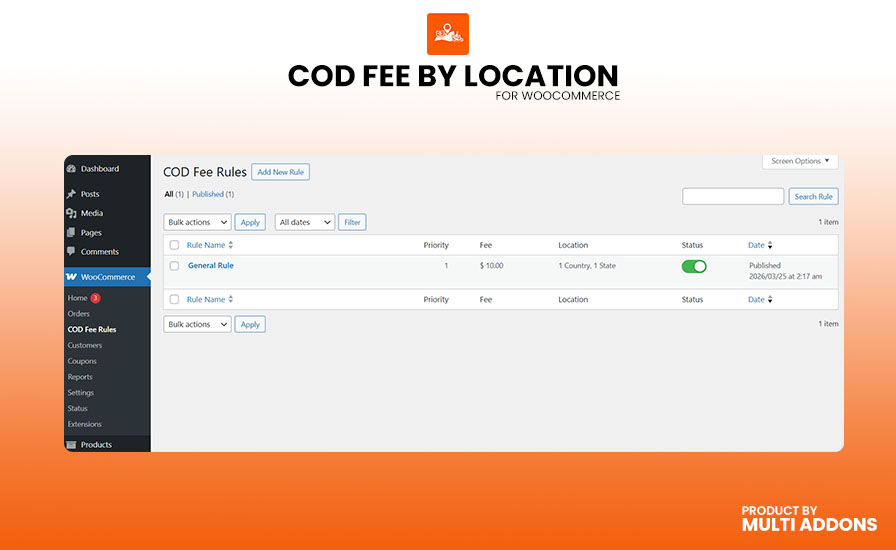
Create unlimited WooCommerce COD fee rules and assign a priority to each rule. When multiple rules match the same order, the plugin automatically applies the highest-priority COD fee, ensuring your most important pricing rule takes effect.

This makes it easy to manage complex Cash on Delivery surcharge rules without conflicts, even when customers match multiple location, cart, product, or category conditions.

User Role & Guest Checkout Controls

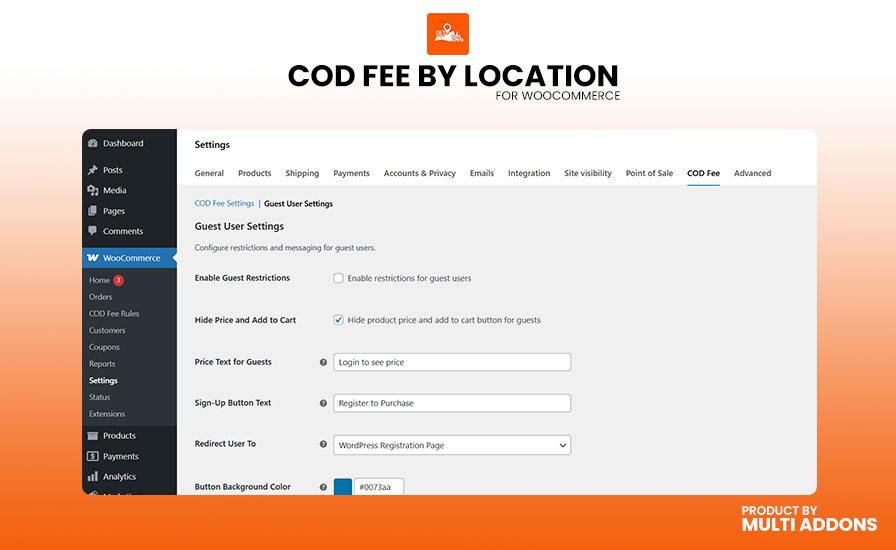
Apply WooCommerce COD fees based on specific user roles, such as charging retail customers while waiving fees for wholesale users. You can also control how Cash on Delivery works for guest customers.

Restrict guest checkout, hide product prices from logged-out users, or display a customizable “Login to View Price” prompt. These flexible controls help you manage COD access and pricing for different types of customers.

WooCommerce Blocks & HPOS Compatibility

Built for the modern WooCommerce checkout, COD Fee by Location works with WooCommerce Blocks and High-Performance Order Storage (HPOS). The plugin is designed to work smoothly with the latest WooCommerce technologies and store configurations.

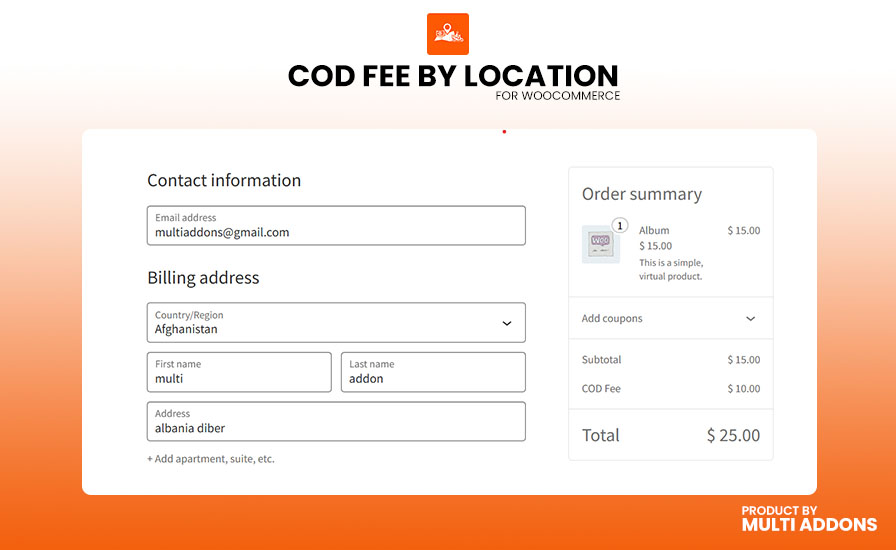
With AJAX-powered fee updates, the COD surcharge can recalculate automatically when customers change their delivery address or ZIP/postcode, without requiring a page reload.

Why People Love MultiAddons Plugin

Technical Compatibility

Frequently Asked Questions

Can I Add a COD Fee by ZIP Code or City in WooCommerce?

Yes. COD Fee by Location lets you add a Cash on Delivery (COD) fee in WooCommerce based on a customer’s delivery location. You can charge a fixed or percentage-based COD surcharge for specific ZIP codes, postcodes, cities, states, or countries.

You can also add multiple ZIP codes at once to quickly apply the same WooCommerce COD fee to selected delivery areas.

Yes. COD Fee by Location lets you apply a fixed or percentage-based WooCommerce COD fee when specific products or categories are in the cart. Create inclusion rules to charge a Cash on Delivery surcharge for selected items or exclusion rules to waive the fee for specific products or categories.

This gives you flexible control over product-based COD fees in WooCommerce while helping you manage additional handling and delivery costs.

Yes. COD Fee by Location includes guest restriction options that let you control Cash on Delivery orders from logged-out customers. You can hide product prices, disable the Add to Cart button for guests, or display a customizable “Login to View Price” message instead.

These WooCommerce guest restrictions help reduce unwanted COD orders while encouraging customers to log in or create an account before purchasing.

Yes, COD Fee by Location is compatible with the new WooCommerce Cart and Checkout Blocks and High-Performance Order Storage (HPOS). The plugin is designed to work with the modern WooCommerce checkout experience while accurately applying Cash on Delivery (COD) fees based on the customer’s location.

The plugin supports the block-based WooCommerce Checkout and works with the WooCommerce Store API, allowing the COD fee to be updated when customers change their billing or shipping information during checkout. This provides a smooth checkout experience without requiring customers to reload the page.

COD Fee by Location also supports WooCommerce HPOS, allowing stores using High-Performance Order Storage to continue managing orders and COD fees efficiently. WooCommerce recommends that extensions declare and test compatibility with both HPOS and Cart & Checkout Blocks.

Whether you use the classic WooCommerce checkout or the modern WooCommerce Checkout Block, you can use COD Fee by Location to apply location-based Cash on Delivery charges to your orders.

Key compatibility features:

  • ✅ WooCommerce Cart and Checkout Blocks compatible
  • ✅ Compatible with the modern WooCommerce Checkout
  • ✅ Supports the WooCommerce Store API
  • ✅ Compatible with High-Performance Order Storage (HPOS)
  • ✅ Automatically updates the applicable COD fee based on customer location
  • ✅ Supports location-based Cash on Delivery charges
  • ✅ Works with modern WooCommerce stores and checkout experiences

COD Fee by Location uses a priority-based rule system to determine which Cash on Delivery (COD) fee should be applied when a customer matches multiple location-based COD fee rules.

When you create your WooCommerce COD fee rules, you can assign a numerical priority to each rule. If a customer’s billing or shipping address matches more than one rule, the plugin uses the priority you configured to determine the applicable COD surcharge.

For example, you could create:

  • USA → $2 COD Fee — Priority 10
  • New York → $5 COD Fee — Priority 20

A customer located in New York may match both rules. Because the New York rule has the higher priority, COD Fee by Location applies the $5 Cash on Delivery fee instead of the general $2 USA fee.

This makes it easy to create both broad and highly specific location-based COD charges without conflicts. You have full control over which WooCommerce Cash on Delivery fee rule takes precedence at checkout.

Key benefits of the priority system:

  • ✅ Easily manage multiple WooCommerce COD fee rules
  • ✅ Set custom priorities for overlapping location rules
  • ✅ Apply specific COD fees to cities, states, countries, or other supported locations
  • ✅ Prevent conflicts between general and specific COD fee rules
  • ✅ Automatically apply the correct Cash on Delivery surcharge at checkout
  • ✅ Maintain complete control over your WooCommerce checkout pricing