
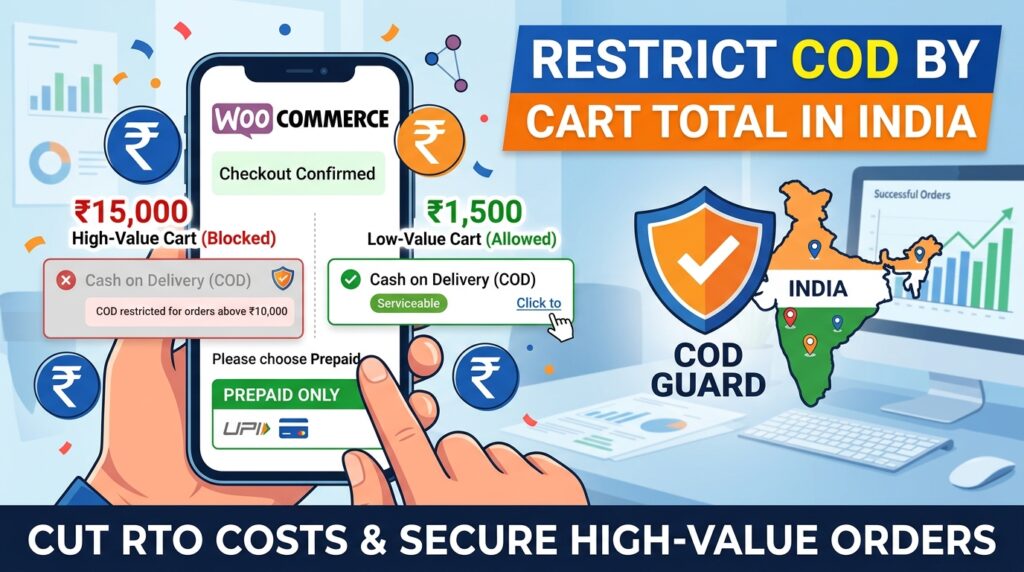
Cash on Delivery remains a top payment choice across India. However, accepting cash payments for expensive, high-value carts creates massive financial exposure for Indian e-commerce brands.
For example, shipping high-ticket cash orders (e.g., above ₹5,000 or ₹10,000) results in crippling Return to Origin (RTO) charges and locked-up inventory when buyers reject delivery at the doorstep.
Consequently, learning how to restrict COD by cart total in India for WooCommerce enables you to set maximum or minimum subtotal caps for cash transactions.
Therefore, applying automated subtotal payment rules protects your working capital and shifts high-value buyers toward instant UPI or credit card gateways.
In this guide, you will learn how subtotal thresholds prevent high-ticket logistics losses. Furthermore, discover how to configure cart limits for Indian shoppers using COD Guard.
Why Subtotal-Based Gateway Limits Are Critical in India
Dispatching expensive products without prepaid commitment increases risk and inventory holding costs. In contrast, dynamically removing Cash on Delivery when carts cross specific rupee amounts guarantees high-value revenue is collected upfront.
In fact, implementing cart total Cash on Delivery limits in India offers three major commercial advantages:
- Eliminate High-Value RTO Losses: First, block cash payments on expensive carts where RTO logistics fees and inventory risk are significantly higher.
- Drive Instant UPI & Card Adoption: Second, encourage shoppers placing large orders to use instant UPI (Google Pay, PhonePe, Paytm) or credit cards for guaranteed order fulfillment.
- Establish Safe Entry-Level CCT Thresholds: Third, allow cash checkouts only on lower-risk, low-ticket orders (e.g., under ₹1,999) where delivery failure costs remain manageable.
How COD Guard Enforces Cart Total Rules for Indian Stores
Setting up dynamic cart subtotal evaluations in native WooCommerce without coding custom PHP functions is challenging. Fortunately, COD Guard for WooCommerce lets you establish minimum and maximum subtotal conditions through an easy visual interface.
Key Subtotal Features in COD Guard:
- Minimum & Maximum Subtotal Limits: First, define precise order value ranges (e.g., allow COD only between ₹499 and ₹2,999) to keep cash orders within safe parameters.
- INR Currency Support: Second, native support for Indian Rupee thresholds makes setup seamless for local merchants.
- Custom Cart Total Alerts: Third, present clear checkout notifications informing buyers that high-value orders require prepaid online payment.
- State & Pin Code Layering: In addition, combine cart total limits with specific 6-digit Indian pin codes or state regions for localized risk control.
- Role & Category Overrides: Finally, bypass subtotal restrictions for verified VIP customer groups or specific low-risk product categories.
3 Simple Steps to Restrict COD by Cart Total Today
- Determine Maximum Cash Risk Thresholds: First, review your average order value (AOV) and RTO reports to set a safe maximum dollar or rupee limit for cash orders.
- Configure COD Guard Subtotal Rules: Next, enter your target minimum and maximum order value rules inside the plugin configuration screen.
- Verify High-Value Checkout Toggles: Finally, test the checkout process with low-value and high-value carts to confirm cash payment options switch off seamlessly.
Safeguard Your High-Value Orders Today
Stop risking your valuable inventory and high-ticket sales on uncollateralized cash transactions. Instead, restrict payment gateways by cart subtotal and protect your store margins in India with COD Guard today.
Additionally, you can protect your store across all regional routes. For example, read our detailed guide on how to reduce RTO in WooCommerce India with COD Guard to implement pin code restrictions and mobile verification workflows.